---
title: How Do I Claim My Complimentary Lifetime Free Trial?
description: It’s automatic! Simply sign up for a new ASSIST account, and you will instantly receive 30 days of complimentary access to our Premium Plan features (including E-Invoicing and Approval Matrix). No credit card is required to start.
---
[Skip to content](https://help.accrets.com/knowledge/how-do-i-sign-up-for-trial#main-content)
English
Show submenu for translations
![Logo - Copy-2.jpg\]](https://help.accrets.com/hs-fs/hubfs/Logo%20-%20Copy-2.jpg?height=40&name=Logo%20-%20Copy-2.jpg)
Open main navigation
Close main navigation
- English
Show submenu for translations
Hello 👋 How can we help you?
- There are no suggestions because the search field is empty.
1. [Help Desk](https://help.accrets.com/knowledge?hsLang=en)
2. [ASSIST](https://help.accrets.com/knowledge/assist?hsLang=en)
3. [Getting Started](https://help.accrets.com/knowledge/assist?hsLang=en#getting-started)
# How Do I Claim My Complimentary Lifetime Free Trial?
## Guide on how to sign-up Free trial
### I. Creating Your Account
Setting up your personal digital assistant is quick and easy:
1. **Visit our website**: Go to [assist.biz](https://help.accrets.com/knowledge/www.assist.biz?hsLang=en)
2. **Sign up:** Click the "Sign Up" button and follow the on-screen instructions
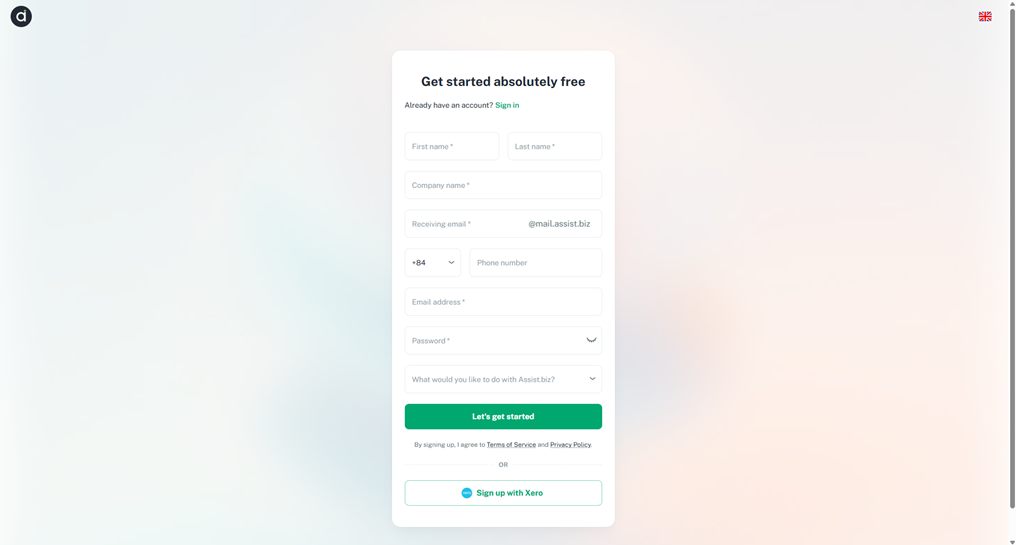
**Note:** *If you encounter any issues or have questions during the process, please don't hesitate to contact our support team.*
> **\*Prerequisite:**
>
> You will need to fill in the following info to register account:
>
> - First Name, Last Name
> - Company name
> - Phone Number
> - Email Address
> - Password
>
> Note that the password must meet the following criteria:
>
> *- At least 8 characters*
>
> *- At least one UPPERCASE letter (A-Z)*
>
> *- At least one lowercase letter (a-z)*
>
> *- At least one number (0-9)*
>
> *- At least one special character (! ” # $ % & ' () \* + , - . / : ; \< = \> ? @ \[ \\ \] ^ \_ \` { | } ~)*
### II. First Time Sign Up
1. You will receive an email notifying you of your account creation. If you don’t receive the email, kindly contact us via *support@assist.biz.*
*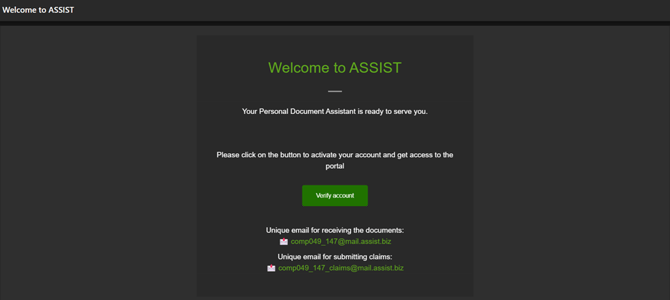*
2. Click on **“Verify account”** and you will be brought to a sign in page.
3. Sign in and you will be brought to your Dashboard.
- [ASSIST](https://help.accrets.com/knowledge/assist?hsLang=en#main-content)
- [Getting Started](https://help.accrets.com/knowledge/assist?hsLang=en#getting-started)
- [Document Details](https://help.accrets.com/knowledge/assist?hsLang=en#document-details)
- [Subscriptions](https://help.accrets.com/knowledge/assist?hsLang=en#subscriptions)
- [Xero Integration](https://help.accrets.com/knowledge/assist?hsLang=en#xero-integration)
- [FAQ](https://help.accrets.com/knowledge/assist?hsLang=en#faq)
[](https://Accrets.com)
Accrets International Pte Ltd
Copyright © 2026, Assist.biz