![Logo - Copy-2.jpg]](https://help.accrets.com/hs-fs/hubfs/Logo%20-%20Copy-2.jpg?height=40&name=Logo%20-%20Copy-2.jpg)
I. Creating Your Account
Setting up your personal digital assistant is quick and easy:
- Visit our website: Go to assist.biz
- Sign up: Click the "Sign Up" button and follow the on-screen instructions
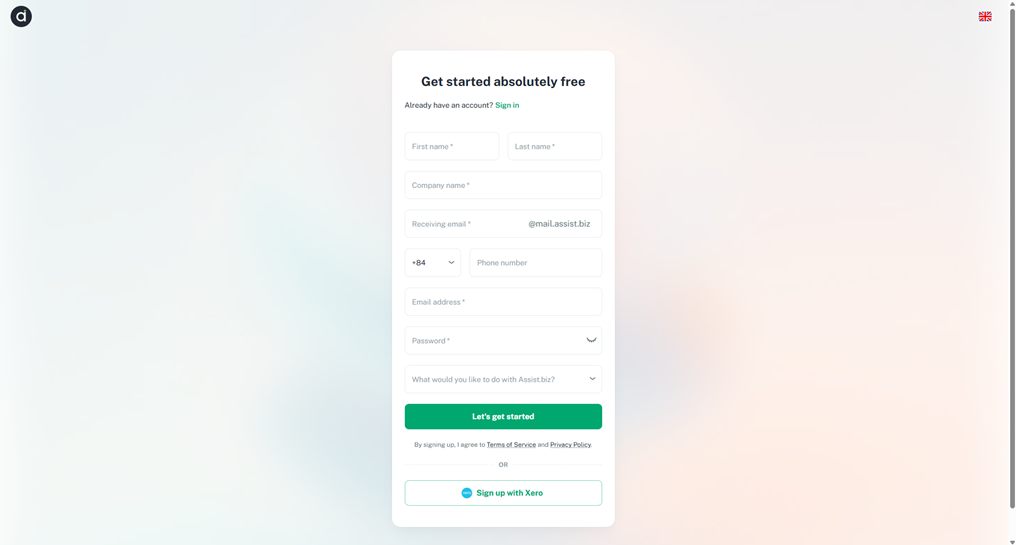
Note: If you encounter any issues or have questions during the process, please don't hesitate to contact our support team.
*Prerequisite:
You will need to fill in the following info to register account:
- First Name, Last Name
- Company name
- Phone Number
- Email Address
- Password
Note that the password must meet the following criteria:
- At least 8 characters
- At least one UPPERCASE letter (A-Z)
- At least one lowercase letter (a-z)
- At least one number (0-9)
- At least one special character (! ” # $ % & ' () * + , - . / : ; < = > ? @ [ \ ] ^ _ ` { | } ~)
II. First Time Sign Up
- You will receive an email notifying you of your account creation. If you don’t receive the email, kindly contact us via support@assist.biz.
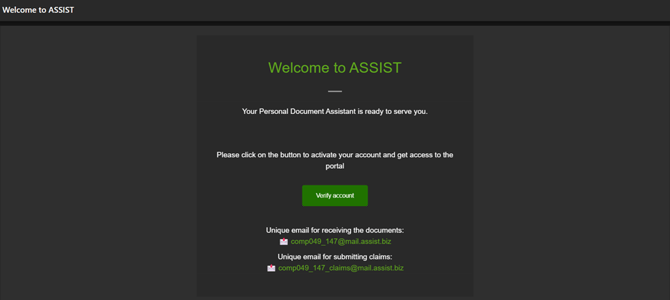
- Click on “Verify account” and you will be brought to a sign in page.
- Sign in and you will be brought to your Dashboard.