---
title: How Does ASSIST Handle Multiple Currencies And Languages?
description: How Does ASSIST Handle Multiple Currencies And Languages?
---
[Skip to content](https://help.accrets.com/knowledge/how-does-assist-handle-multiple-currencies-and-languages#main-content)
English
Show submenu for translations
![Logo - Copy-2.jpg\]](https://help.accrets.com/hs-fs/hubfs/Logo%20-%20Copy-2.jpg?height=40&name=Logo%20-%20Copy-2.jpg)
Open main navigation
Close main navigation
- English
Show submenu for translations
Hello 👋 How can we help you?
- There are no suggestions because the search field is empty.
1. [Help Desk](https://help.accrets.com/knowledge?hsLang=en)
2. [ASSIST](https://help.accrets.com/knowledge/assist?hsLang=en)
3. [FAQ](https://help.accrets.com/knowledge/assist?hsLang=en#faq)
# How Does ASSIST Handle Multiple Currencies And Languages?
## ASSIST Global Settings & Security FAQ
Learn how the system adapts to international invoices and diverse team requirements without losing original data accuracy.
#### I. Currency Setting
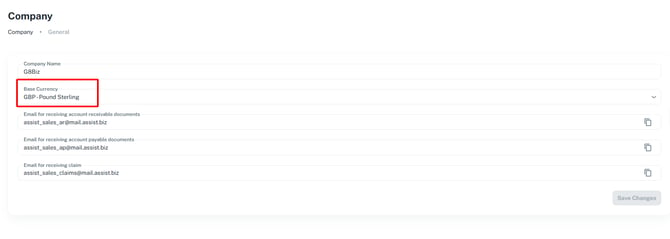
1. **Setting a Base Currency:** When configuring your company profile, you can set a primary base currency (e.g., GBP or SGD) for your dashboard.
#### II. Currency Recognition & Languages
1. **Automatic Currency Recognition:** The AI automatically recognizes the foreign currency stated on the uploaded invoice. It will display the original invoice total, but can also show the equivalent converted amount based on your established base currency.
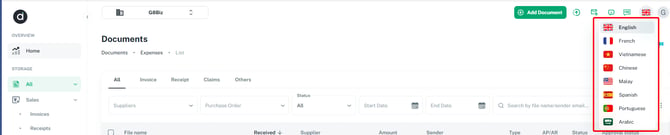
2. **Dashboard Languages:** The user interface supports multiple languages to accommodate global teams, including **English, French, Vietnamese, Chinese, Malay, Spanish, Portuguese, and Arabic.**
**Data Extraction Language:** When extracting data from foreign documents, the AI keeps the extracted text in its original language (e.g., French line items remain in French) rather than translating it into English.
*ASSIST is an AI-powered document management and e-invoicing solution founded in 2021. Headquartered in Singapore, it serves businesses across Singapore and Malaysia by streamlining finance workflows, digitizing supplier invoices, and significantly reducing manual data entry.*````
``
- [ASSIST](https://help.accrets.com/knowledge/assist?hsLang=en#main-content)
- [Getting Started](https://help.accrets.com/knowledge/assist?hsLang=en#getting-started)
- [Document Details](https://help.accrets.com/knowledge/assist?hsLang=en#document-details)
- [Subscriptions](https://help.accrets.com/knowledge/assist?hsLang=en#subscriptions)
- [Xero Integration](https://help.accrets.com/knowledge/assist?hsLang=en#xero-integration)
- [FAQ](https://help.accrets.com/knowledge/assist?hsLang=en#faq)
[](https://Accrets.com)
Accrets International Pte Ltd
Copyright © 2026, Assist.biz